


Adobe Dimension 4.1.10 (x64) Multilingual Download – Create Professional 3D Product Designs
Adobe Dimension is a 3D design and visualization application developed by Adobe. It helps designers create realistic product mockups, branded compositions, packaging previews, and marketing visuals without requiring advanced 3D modeling experience. Its user-friendly workspace allows users to combine 3D models, materials, lighting, and 2D graphics to produce professional-looking images.
If you are searching for Adobe Dimension Download, this guide explains its features, capabilities, installation process, system requirements, and how it can support your creative projects.
Adobe Dimension is particularly useful for graphic designers, product designers, marketing professionals, and creative teams who want to present their ideas through realistic 3D visuals. Instead of building every object from scratch, users can import supported 3D assets and arrange them in a scene.
| Part / Link | Rapidgator / DDownload | Nitroflare |
| Dimension v4.1.10 (Part 1) | 🟢 DOWNLOAD | 🔴 DOWNLOAD |
| Dimension v4.1.10 (Part 2) | 🟢 DOWNLOAD | 🔴 DOWNLOAD |
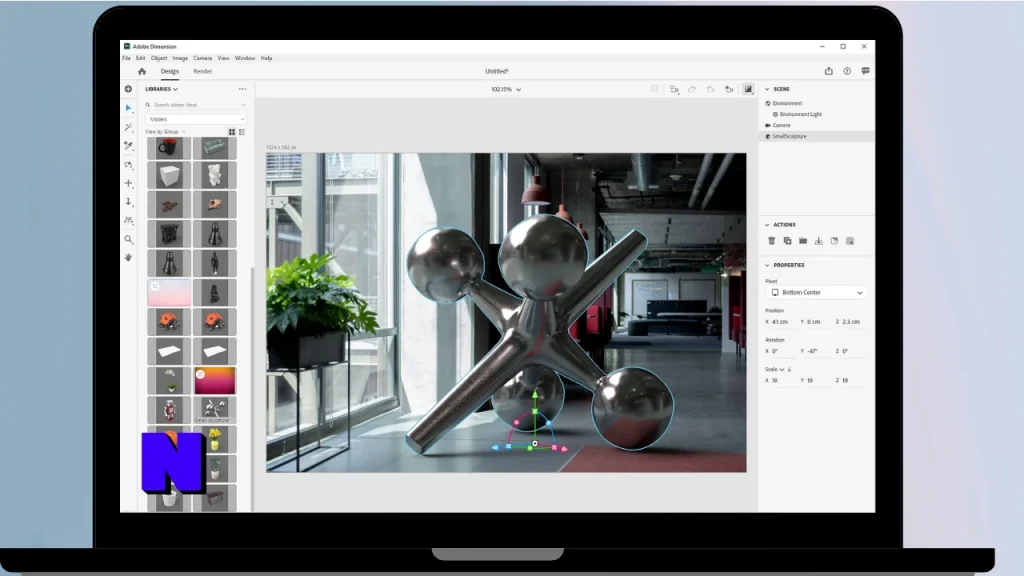
What Is Adobe Dimension?
Adobe Dimension is a 3D design and rendering application designed to make product visualization easier. It allows users to place 3D objects into a scene, apply realistic materials, adjust lighting, and create high-quality compositions.
The software works with other Adobe creative applications, making it easier to incorporate graphics and design assets into 3D presentations. For example, users can create artwork in Adobe Illustrator or Photoshop and use those designs as part of a 3D composition.
Adobe Dimension is suitable for creating product packaging previews, promotional graphics, advertising images, brand presentations, and other visual content.
Key Features of Adobe Dimension
1. User-Friendly 3D Workspace
Adobe Dimension provides an accessible workspace for arranging 3D objects and creating scenes. Its interface is designed to help graphic designers work with 3D elements without needing extensive modeling knowledge.
2. Realistic 3D Rendering
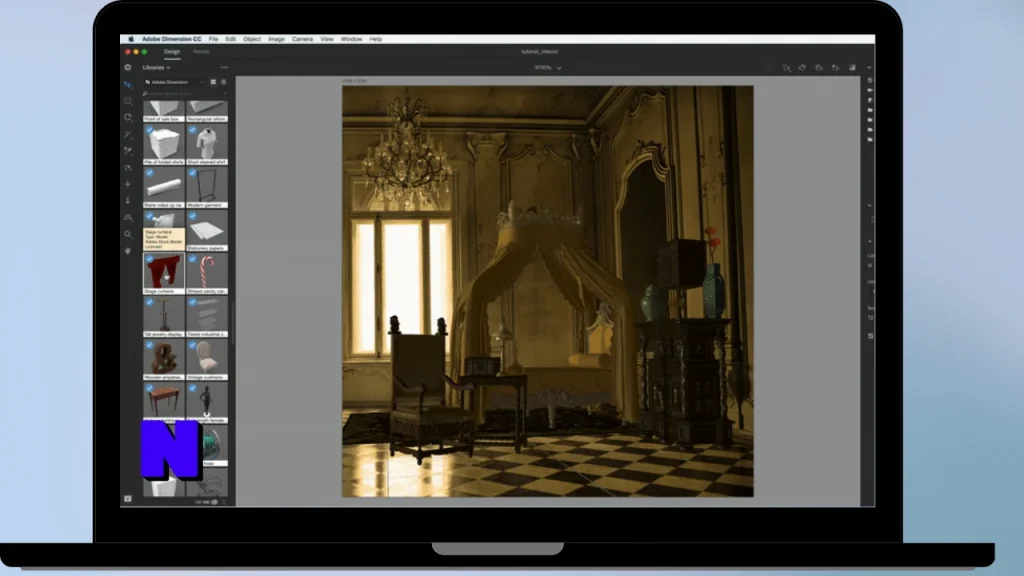
The application allows users to create realistic visual compositions with materials, shadows, reflections, and lighting. These features help product images look more professional.
3. Product Mockup Creation
One of the most useful capabilities is product mockup creation. Designers can visualize logos, labels, packaging, and artwork on 3D objects before producing the final design.
4. Material Customization
Users can adjust the appearance of 3D objects by applying different materials. Material properties help create surfaces that resemble plastic, metal, glass, paper, and other finishes.
5. Lighting Controls
Lighting plays an important role in realistic product visualization. Adobe Dimension provides lighting options that help users control shadows, highlights, and the overall atmosphere of a scene.
6. 3D Model Importing
Users can import supported 3D models and incorporate them into their projects. This makes it possible to work with existing assets rather than creating every object manually.
7. Background Customization
Designers can customize the scene background to match their creative requirements. Different backgrounds can help make product presentations more attractive and suitable for advertising.
8. Adobe Creative Cloud Integration
Adobe Dimension works within Adobe’s creative ecosystem. Users can combine graphics and design assets created in compatible Adobe applications to build more detailed visual compositions.
9. Camera and Scene Controls
The application provides tools for adjusting camera angles and positioning objects. These controls help users find the best perspective for presenting a product or design.
10. High-Quality Image Export
After completing a project, users can render and export their compositions as images for presentations, websites, marketing campaigns, and other creative purposes.
Benefits of Using Adobe Dimension
Adobe Dimension offers several advantages for designers who need realistic product visuals.
- Easy 3D Design: Create visual compositions without mastering complicated 3D modeling workflows.
- Professional Mockups: Present packaging, logos, and branding concepts in realistic environments.
- Creative Flexibility: Combine 3D objects, graphics, materials, and backgrounds.
- Better Presentations: Show clients how a product or design could look in a real-world setting.
- Time-Saving Workflow: Use existing 3D assets to speed up the design process.
- Adobe Integration: Incorporate artwork from compatible Adobe creative applications.
What Can You Create with Adobe Dimension?
Adobe Dimension is useful for many types of creative projects.
Product Packaging Designs
Create realistic previews of bottles, boxes, containers, and other packaging concepts. This helps designers review product branding before manufacturing.
Logo and Branding Presentations
Place logos and graphic designs on 3D objects to create professional brand presentations.
Advertising Graphics
Create attractive product visuals for promotional campaigns, social media posts, and marketing materials.
Product Visualization
Present products from different camera angles with realistic materials and lighting.
Creative Portfolio Projects
Design impressive 3D compositions to showcase your graphic design and visualization skills.
How to Use Adobe Dimension
Getting started with Adobe Dimension is relatively straightforward.
- Create a Project: Open the application and start a new 3D scene.
- Import 3D Objects: Add supported 3D models to your workspace.
- Arrange Objects: Position and scale the objects according to your composition.
- Apply Materials: Customize the surfaces to achieve the desired appearance.
- Add Graphics: Incorporate logos, labels, and other artwork into the scene.
- Adjust Lighting: Modify the lighting to create realistic shadows and highlights.
- Set the Camera: Choose an appropriate camera angle and composition.
- Render the Scene: Generate the final image and export it for your project.
Adobe Dimension Download and Installation
If you want to install Adobe Dimension on your Windows computer, use a legitimate Adobe distribution or account-based installation method where the application is available.
Follow these general steps:
- Visit Adobe’s official website.
- Check the current availability and compatibility of Adobe Dimension.
- Sign in with your Adobe account if required.
- Download the application through an authorized Adobe installation method.
- Open the installer and follow the displayed instructions.
- Complete the installation process.
- Launch the application and sign in if activation is required.
Important: Adobe Dimension is a discontinued product, so availability, downloads, and support may be limited. Check Adobe’s current product information and your account’s access before attempting installation. Avoid unofficial modified installers, cracked versions, or unauthorized activation tools.
Adobe Dimension System Requirements
The exact requirements depend on the application version and operating system. A compatible Windows computer with suitable graphics hardware is recommended for a smooth 3D workflow.
| Component | Recommended Consideration |
|---|---|
| Operating System | Compatible 64-bit Windows version |
| Processor | Modern multi-core Intel or AMD processor |
| RAM | 8 GB minimum recommended; more is beneficial |
| Graphics | Compatible dedicated or integrated GPU |
| Storage | Sufficient free disk space for installation and projects |
| Display | Full HD display recommended |
| Internet | Required for account-related services and downloads |
Actual compatibility should be checked against the requirements for the specific version you intend to use.
Pros and Cons of Adobe Dimension
Pros
- Beginner-friendly 3D visualization workflow.
- Useful for realistic product mockups.
- Supports material and lighting customization.
- Helps create professional marketing visuals.
- Works with compatible Adobe creative assets.
- Suitable for branding and packaging presentations.
Cons
- Not a complete advanced 3D modeling solution.
- Rendering can require capable hardware.
- Product availability and support are limited because it is discontinued.
- Some workflows may require additional Adobe applications.
- Advanced 3D projects may need more specialized software.
Adobe Dimension Alternatives
If Adobe Dimension is unavailable for your system or Adobe account, you can explore other 3D design applications.
- Blender: A powerful 3D creation application for modeling, rendering, animation, and visualization.
- Adobe Substance 3D Stager: A product visualization application for arranging 3D scenes and creating rendered images, subject to current availability.
- SketchUp: A 3D modeling application used for product concepts, architecture, and design.
- Cinema 4D: A professional 3D application for modeling, animation, and motion graphics.
Each alternative offers different features and workflows, so choose according to your project requirements.
Is Adobe Dimension Worth Using?
Adobe Dimension can be useful for designers who want to create realistic 3D product mockups and branded compositions without learning a complicated modeling workflow. Its combination of 3D objects, materials, lighting, and graphic assets makes it suitable for packaging previews, advertising visuals, and product presentations.
However, its discontinued status is an important consideration. New users should check whether a legitimate installer and compatible version are available before planning a project around it. Users who need ongoing updates and support may prefer a currently maintained alternative.
Frequently Asked Questions (FAQs)
1. What is Adobe Dimension used for?
Adobe Dimension is used to create 3D product mockups, packaging previews, branding compositions, advertising graphics, and realistic product visualizations.
2. Is Adobe Dimension free to download?
Adobe Dimension is commercial Adobe software. Availability and licensing depend on Adobe’s current distribution and account policies. A free download should not be confused with a permanently free license.
3. Is Adobe Dimension available for Windows?
Adobe Dimension was developed for desktop operating systems, including compatible Windows versions. However, users should verify version compatibility and current availability before installation.
4. Is Adobe Dimension discontinued?
Yes. Adobe Dimension is a discontinued product, and its availability and support may be limited. Check Adobe’s current information for the latest status.
5. Can beginners use Adobe Dimension?
Yes. Its interface and scene-building workflow make it accessible to graphic designers and beginners who want to create basic 3D product visualizations.
6. Can Adobe Dimension create product mockups?
Yes. It can be used to place artwork and branding onto 3D objects to create realistic product mockups and packaging presentations.
7. Does Adobe Dimension support 3D models?
Yes. It supports importing compatible 3D assets for use in scenes and product visualization projects.
8. What is the best alternative to Adobe Dimension?
Blender is a popular alternative for comprehensive 3D creation. Other options include Adobe Substance 3D Stager, SketchUp, and Cinema 4D.
9. Can Adobe Dimension create realistic renders?
Yes. It provides rendering capabilities that combine materials, lighting, shadows, and reflections to produce realistic visual compositions.
10. Is Adobe Dimension good for graphic designers?
Yes. It is particularly useful for graphic designers who want to present logos, packaging, branding, and product concepts in a 3D environment.
Conclusion
Adobe Dimension is a useful 3D visualization application for creating realistic product mockups, packaging designs, branding presentations, and advertising graphics. Its beginner-friendly workflow allows graphic designers to combine 3D objects, materials, lighting, and artwork without requiring advanced modeling skills.
Although Adobe Dimension has been discontinued, it remains relevant to users who already have access to a compatible version. Before searching for Adobe Dimension Download, verify its current availability and licensing requirements. If you need an actively maintained solution, consider exploring Blender or other modern 3D visualization applications.


