


Bitsum Process Lasso Pro 19.0.0.94 Multilingual Download
Bitsum Process Lasso Pro is an advanced Windows system optimization utility designed to improve computer responsiveness and provide better control over running processes. It helps users manage CPU priorities, configure process behavior, monitor system activity, and optimize how applications use available system resources.
When multiple applications run simultaneously, some programs may consume excessive CPU resources and affect overall system performance. Process Lasso helps address these situations through intelligent process management features and automated optimization technologies.
Whether you use your computer for gaming, multitasking, professional applications, or everyday productivity, Bitsum Process Lasso Pro provides tools to manage background processes and maintain a smoother Windows experience.
If you are looking for Bitsum Process Lasso Pro Download, this article covers its main features, benefits, system requirements, installation process, and practical uses.
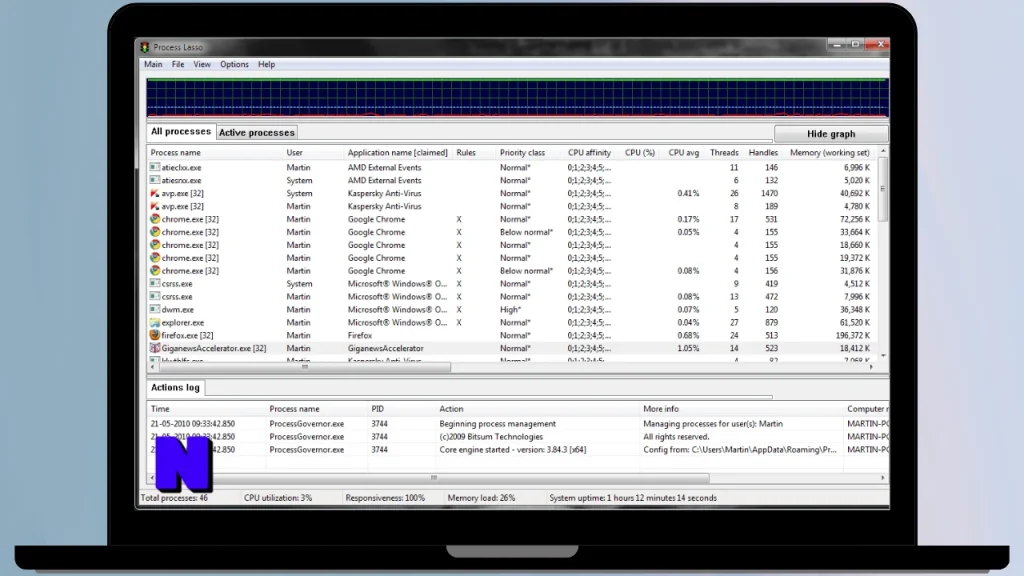
What Is Bitsum Process Lasso Pro?
Process Lasso is a Windows process management program developed by Bitsum. It is designed to help users control how applications and background processes utilize CPU resources.
Unlike traditional task management utilities, Process Lasso offers advanced automation features that allow users to create rules for individual applications. These settings can help prevent demanding processes from negatively affecting other running programs.
The software includes process priority management, CPU affinity controls, automated performance policies, and system monitoring features.
Its Pro edition provides additional functionality for users who need more advanced control over process management and system optimization.
Key Features of Bitsum Process Lasso Pro
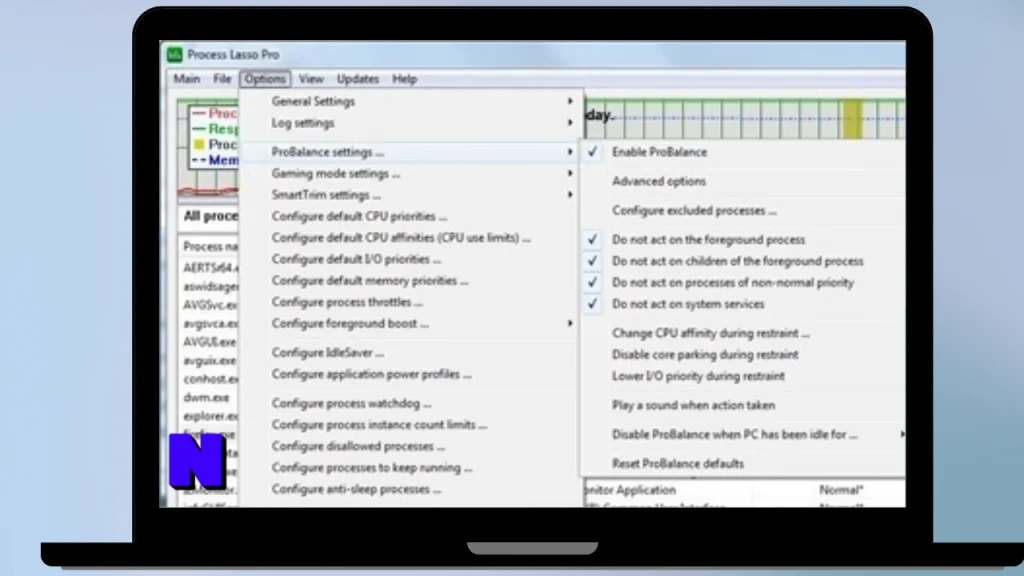
1. ProBalance Technology
One of the most recognized features of Process Lasso is ProBalance. This technology helps maintain system responsiveness by intelligently adjusting the priorities of demanding processes when necessary.
It is designed to reduce situations where one application consumes excessive CPU resources and makes the entire computer feel slow.
2. CPU Priority Management
Process Lasso allows users to configure CPU priorities for individual applications. This makes it possible to give important applications more processing attention when needed.
Users can establish priority rules for specific programs instead of repeatedly changing settings manually.
3. CPU Affinity Control
CPU affinity settings allow users to control which processor cores an application can use.
This feature can be useful for advanced users who want to customize how certain applications distribute their workloads across available CPU cores.
4. Performance Mode
Performance Mode allows selected applications to trigger performance-oriented system behavior.
This can be useful when launching demanding applications such as games, video editing software, and professional tools.
5. Application Power Profiles
Process Lasso provides options for managing application behavior and power-related settings. Users can configure different rules depending on the application and their performance requirements.
6. Automated Process Rules
Users can create persistent rules for individual processes. These settings can automatically apply whenever a particular application starts.
This reduces the need to configure process priorities and other settings every time Windows launches a program.
7. CPU Usage Monitoring
The software provides information about running processes and CPU activity. Users can monitor resource consumption and identify applications that may be affecting system performance.
8. Gaming Performance Optimization
Process Lasso can help gamers manage background applications and configure performance-related rules.
Its process management features may improve responsiveness during demanding gaming sessions, although actual performance gains depend on hardware, software, and system configuration.
9. Background Process Management
Windows regularly runs multiple background applications and services. Process Lasso provides additional controls for managing these processes and configuring their behavior.
10. Advanced Configuration Options
The Pro edition offers advanced settings for users who want more control over Windows process management, automation, and performance policies.
Benefits of Using Process Lasso Pro
Bitsum Process Lasso Pro offers several advantages for users who regularly work with resource-intensive applications.
- Helps maintain Windows system responsiveness.
- Provides advanced CPU priority controls.
- Supports automated process management.
- Allows configuration of CPU affinity.
- Helps manage demanding background applications.
- Provides performance-oriented application settings.
- Offers detailed process monitoring.
- Reduces the need for repeated manual configuration.
- Supports customized rules for individual applications.
How Does Process Lasso Pro Work?
Process Lasso monitors running applications and manages their behavior according to configured rules and optimization policies.
For example, when a demanding application starts consuming excessive CPU resources, ProBalance can intervene to help maintain responsiveness for other applications.
Users can also configure permanent rules for specific programs. These rules can determine CPU priority, affinity, and other process-related settings.
The main objective is to make Windows resource management more flexible and automated.
Process Lasso Pro for Gaming
Gamers often run several applications simultaneously, including games, voice communication software, recording tools, browsers, and background services.
Process Lasso provides tools that can help manage these applications more efficiently.
Its gaming-related benefits include:
- Configuring performance rules for selected games.
- Managing background process priorities.
- Using Performance Mode with supported applications.
- Controlling CPU affinity when necessary.
- Monitoring CPU usage during gaming sessions.
- Helping maintain system responsiveness during multitasking.
However, Process Lasso does not guarantee higher FPS. Performance improvements depend on the computer’s hardware, game requirements, and background workload.
Process Lasso Pro for Professional Work
Process Lasso is not limited to gaming. It can also be useful for professionals who work with demanding Windows applications.
Video Editing: Manage resource-intensive editing applications and background processes.
3D Rendering: Configure process priorities for rendering applications.
Software Development: Manage multiple development tools and background tasks.
Multitasking: Create rules for applications that frequently run together.
Office Productivity: Monitor and manage applications that consume unnecessary system resources.
Process Lasso Pro vs Standard Edition
| Feature | Standard Edition | Pro Edition |
|---|---|---|
| Process Management | Yes | Yes |
| ProBalance | Yes | Yes |
| CPU Priority Control | Yes | Yes |
| CPU Affinity | Yes | Yes |
| Process Monitoring | Yes | Yes |
| Advanced Automation | Limited | Expanded |
| Pro Features | Limited | Available |
| Commercial Licensing | Depends on terms | Depends on license |
The exact feature availability and licensing conditions can change between software releases. Check the official edition comparison before purchasing or installing.
System Requirements
The exact system requirements depend on the installed Process Lasso version.
| Requirement | Details |
|---|---|
| Operating System | Microsoft Windows |
| Processor | Compatible Intel or AMD processor |
| RAM | Depends on Windows requirements |
| Storage | Small installation footprint |
| Architecture | Check the current installer |
| Internet | Required for downloading and online activation where applicable |
For the best experience, use an updated Windows installation and download the version compatible with your system.
Bitsum Process Lasso Pro Download and Installation
Follow these steps to install Process Lasso on your Windows computer:
- Visit the official Bitsum website.
- Navigate to the Process Lasso download page.
- Select the available Windows installer.
- Download the setup file to your computer.
- Run the installer with the required permissions.
- Follow the installation instructions.
- Launch Process Lasso after installation.
- Review the available process management settings.
- Configure optimization rules according to your requirements.
Important: Process Lasso offers different licensing options. Some features may require a Pro license. Use the official free edition or trial where available rather than unauthorized activation tools.
Pros and Cons of Bitsum Process Lasso Pro
Pros:
- Advanced Windows process management.
- Intelligent ProBalance technology.
- Customizable CPU priority settings.
- CPU affinity configuration.
- Automated application rules.
- Useful for gaming and multitasking.
- Detailed process monitoring.
- Lightweight utility compared with many large optimization suites.
Cons:
- Advanced settings may confuse beginners.
- Incorrect process configuration can affect application behavior.
- Some features require a paid Pro license.
- Performance improvements vary depending on hardware and workload.
- Requires careful configuration for specialized applications.
Is Bitsum Process Lasso Pro Worth Using?
Bitsum Process Lasso Pro is a useful utility for Windows users who want more control over CPU usage and application behavior.
Its ProBalance technology, automated process rules, CPU priority management, and Performance Mode make it a practical choice for advanced users, gamers, and professionals.
Although it cannot replace a hardware upgrade or solve every performance problem, it provides additional tools for managing system resources.
If you frequently run demanding applications or perform multiple tasks simultaneously, Process Lasso Pro is worth considering.
Frequently Asked Questions (FAQs)
1. What is Bitsum Process Lasso Pro?
Bitsum Process Lasso Pro is a Windows utility that helps users manage running processes, control CPU priorities, and improve system responsiveness.
2. Is Process Lasso Pro free?
Process Lasso offers a free edition, while certain advanced features require a Pro license. Check the official website for current licensing details.
3. Does Process Lasso improve gaming performance?
It can help manage background processes and configure application performance settings. However, FPS improvements are not guaranteed.
4. What is ProBalance in Process Lasso?
ProBalance is a technology designed to maintain system responsiveness by intelligently adjusting the behavior of demanding processes.
5. Does Process Lasso work on Windows 11?
Process Lasso supports modern Windows versions. Check the official system requirements for compatibility with your Windows 11 installation.
6. Can Process Lasso control CPU affinity?
Yes. It provides CPU affinity controls that allow users to configure which processor cores individual applications can use.
7. Is Process Lasso safe to use?
Process Lasso is a legitimate Windows process management utility. Download it from the official Bitsum website and use its configuration options carefully.
8. Does Process Lasso run in the background?
Yes. It can operate in the background to monitor processes and apply configured optimization rules automatically.
Conclusion
Bitsum Process Lasso Pro is a powerful Windows process management utility that provides advanced control over CPU resources and application behavior. With features such as ProBalance, CPU priority management, CPU affinity, Performance Mode, and automated process rules, it helps users customize how their computers handle demanding applications.
For gamers, professionals, and multitasking users, Process Lasso can be a valuable addition to a Windows optimization toolkit.
If you are searching for Bitsum Process Lasso Pro Download, visit the official Bitsum website to get the latest compatible version and review the available free and Pro licensing options.


